
Minexa.ai
Yelp business fields worth extracting for local sales
A Yelp search for "plumbers in Austin" is already a lead list. You just need the right columns out of it. Here's which fields matter, and how to pull them into clean JSON with the Minexa.ai API.
Minexa.ai is an AI web scraping API. You train a scraper on one Yelp page in your browser, then run it on every similar page through the API.
{
  "business_name": "Tony's Pizza Napoletana",
  "rating": "4.2",
  "review_count": "342",
  "price_range": "$$",
  "phone": "(415) 835-9888",
  "website": "/biz_redir?url=http%3A%2F%2F...",
  "claimed": "Claimed",
  "categories": ["Pizza", "Italian"],
  "street_address": "1570 Stockton St",
  "city": "San Francisco"
}
Illustrative. Column names are generated when you create the scraper and may differ.
The fields that move a sales pipeline
Not every field on a Yelp page earns a CRM column. If you keep only five, keep these:
- Business name
- Yelp URL
- Phone
- Website
- Claimed status
The rest help you qualify and sort the list.
Contact and identity
- Business name and Yelp URLThe Yelp URL is your dedupe key. It stays stable when the same business is spelled three ways elsewhere.
- PhoneThe fastest way to reach a local business. Reps check it first.
- WebsiteUsually a Yelp redirect link with the real address encoded inside. Decode it and you get a domain to match against your CRM.
Signals to sort by
- Claimed or unclaimedUnclaimed means nobody manages the listing. That's an easy opener if you sell listing, review or marketing services.
- Sponsored and advertiser flagsThese businesses already pay for placement, so they have a marketing budget. Keep them apart from organic results.
- Rating and review countTells a busy 4.8 star shop from a quiet one with six reviews. Both can be good leads, for different offers.
What the business is
- CategoriesSplits a mixed search into the niches you sell to, like Pizza versus Cocktail Bars.
- Price range$ to $$$$. A rough proxy for ticket size.
- HoursWhen someone will pick up, and a hint that a business may have closed.
- Amenities"Takes reservations" or "Offers delivery" qualify leads for products built around those services.
- Health inspection resultShown for some food businesses in some areas. Useful if you sell into food safety.
Location
- Street, city, state, postal codeKept as separate values when the page shows them separately. Route by postcode without parsing a string.
- Latitude and longitudeFor density maps, territory lines and field visit routes.
No emails on Yelp. Business pages show a phone and a website, not an email. If you need email, the website column is where that separate enrichment step starts.
Why not just use the Yelp Places API?
It's the official route, and if it covers your use case, use it. For building lead lists it runs into limits fast:
- Up to 3 review excerpts per business
- 30,000 calls a month base, 5,000 a day on Starter
- Cached data must be refreshed within 24 hours
- No bulk download
- Terms prohibit building competing directories or databases
- Commercial use needs a paid plan
So most teams work from the public pages instead. That's where the two real problems show up: Yelp's bot detection, and keeping output consistent over thousands of pages.
Two scrapers: search results, then business pages
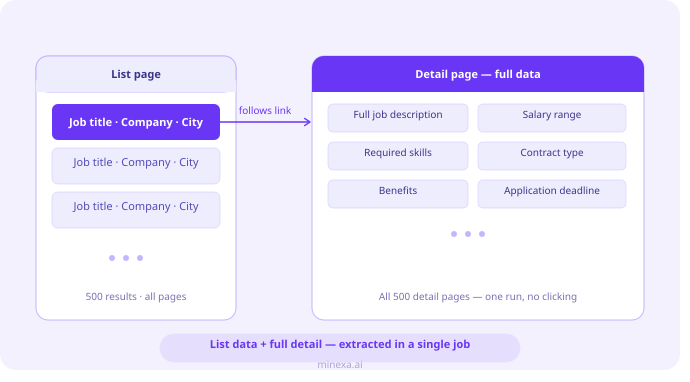
Search results give you the list and the Yelp links. Business pages give you the details. You build one scraper per page type, once, in the Chrome extension.
Search results (list scraper)
- Open a Yelp search for your category and city.
- In the extension: Advanced scenarios, List Mode, Continue.
- Check the highlighted container wraps the result rows. Pick another from the dropdown if not.
- Click Create Scraper. Every data point in each row gets found and named for you.
Business pages (detail scraper)
- Open a Yelp business page and choose Detail Mode.
- Click Add URLs and paste 3 more business pages. Accuracy goes up noticeably.
- Confirm the container holds all the business info, then Create Scraper.
- Click API Request and copy the ready-to-run Python.
Run it on every page you need
One endpoint: https://api.minexa.ai/data/. Swap in your scraper_id, API key and Yelp URLs. The code the extension generates is the source of truth. This shows the shape.
import json
import requests

url = "https://api.minexa.ai/data/"
headers = {"Content-Type": "application/json", "api-key": "YOUR_API_KEY"}

# One URL per results page. You define pagination:
# list the page URLs, or script clicks in js_code.
search_urls = [
    "https://www.yelp.com/search?find_desc=plumbers&find_loc=Austin%2C+TX",
    # next results pages here
]

data = {
    "batches": [{
        "scraper_id": 6214,
        "columns": ["top_30"],
        "urls": search_urls,
        "scraping": {
            "js_render": True,
            "timeout": 30,
            "js_code": [
                {"wait_time": 2},
                {"page_init": True},
                {"wait_time": 4}
            ],
            "provider": "service3",
            "proxy": "verified",
            "country": "us",
            "retry": 3
        }
    }],
    "threads": 3
}
rows, next_set = [], None
while True:
if next_set:
data["next"] = next_set
elif "next" in data:
del data["next"]
response = requests.post(url, json=data, headers=headers)
if response.status_code != 200:
print("Request failed", response.status_code, response.content)
break
payload = response.json()
for extraction in payload["response"]:
for row in extraction["results"]:
if row.get("error"):
continue
rows.append(row)
next_set = payload.get("meta", {}).get("next")
if not next_set:
break
with open("yelp_businesses.json", "w", encoding="utf-8") as f:
json.dump(rows, f, ensure_ascii=False, indent=2)Then pass the business URLs you collected to your detail scraper, for example "scraper_id": 8407 with ["top_70"].
Pick your columns
["top_30"] returns a ranked set of fields, and the same value always gives the same columns. Once you know what you keep, pass the names instead. Same cost.
Decode the website
You get the value exactly as it is in the HTML, redirect included. One urllib.parse call pulls the real domain from the url parameter.
Refresh weekly
Run the script from your own cron job or orchestrator. Thousands of URLs fit in a batch and run in parallel up to your plan's thread limit.
Getting past Yelp's bot detection
Yelp uses DataDome. It checks TLS fingerprints, IP reputation, browser behavior and request patterns, so plain HTTP libraries get blocked or hit a CAPTCHA.
Minexa.ai handles rendering, proxies, CAPTCHAs and anti-bot inside the same call. When a page pushes back, you step up the config. Each step costs more credits, so test on a handful of URLs and stop at the first config that works.
| Config | Use it when | Credits per page |
|---|---|---|
| JS rendering, verified proxy | First try on search and business pages | 4 |
| JS rendering, residential proxy | Verified proxies get blocked | 40 |
provider: "service2" | Last resort for pages that still fail | 45 (60 with residential proxies, 60 to 80 with bypass) |
| Extract only, your own HTML | You already fetch Yelp pages yourself | 1 |
Common errors. container_not_found: check the scraper_id matches the page type. If it does, try country, then more wait time in js_code, then a residential proxy. bad_html: raise retry or switch to service2.
Same page in, same row out
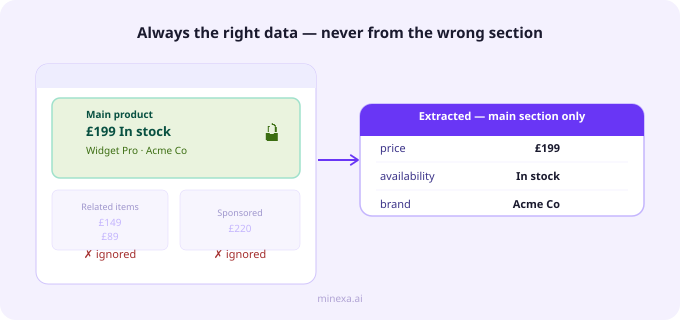
Minexa.ai uses AI to build the scraper, then extracts straight from the page structure. Each column is tied to a selector picked from thousands of candidates. The phone column is the phone, on every page, every run.
No leaks from nearby sections. Container locking keeps extraction inside the block you selected, so sponsored results and "people also viewed" sections stay out of the record.
Missing stays missing. No website on the page means null, not a value borrowed from the next field.
Errors are loud. Send a business URL to the search scraper, or hit a Yelp redesign, and you get an error or nulls, not plausible wrong data. Retraining takes a few minutes and gives you a new scraper_id.
Already fetching Yelp pages? Pay 1 credit for extraction
Keep your scraping stack, proxies or scraping API. Store the HTML anywhere with a URL, train a scraper on the same page type, and send the files over. Minexa.ai only runs the extraction.
data = {
    "scraping": {"js_render": False, "proxy": "verified"},
    "file_urls": [
        "https://your-bucket.cloudfront.net/yelp-biz-0001.html",
        "https://your-bucket.cloudfront.net/yelp-biz-0002.html"
    ],
    "urls": [
        "https://www.yelp.com/biz/business-one-austin",
        "https://www.yelp.com/biz/business-two-austin"
    ]
}
urls and file_urls match one to one, so each row maps back to its Yelp page. Copy the exact body from the API Request panel.
From one territory to a whole country
Unlimited websites on every plan. A standard page is 1 credit. Protected pages use more, per the table above. Credits reset monthly.
Personal
$15- 10,000 credits a month
- 3 threads
- 100 scrapers
Startup
$60- 120,000 credits a month
- 10 threads
- 500 scrapers
Business
$500- 2,000,000 credits a month
- 100 threads
- 5,000 scrapers
Check this before you build the list
Yelp's terms of service prohibit scraping. Whether collecting public data is allowed depends on where you are and what you do with it, so check your use case and get legal advice for commercial or large projects.
Stick to business information, not reviewer personal data, and follow GDPR and CCPA once contact details land in your CRM.
Build your first Yelp scraper today
Install the extension, open a Yelp search, and you'll have a scraper_id ready for the API in a few minutes.
Getting blocked a lot? Read how websites block scrapers, and what developers should take away.